UNPAID EBAY SALES - CUSTOMER ADVISED THE DATE AND TIME OF PICK UP
NOTE: This is ONLY for UNPAID EBAY CUSTOMERS who purchased an item and sent us a message advising the date and time of pick up via phone call, e-mail, or eBay message.
UNPAID EBAY SALES - CUSTOMER ADVISED THE DATE AND TIME OF PICK UP
1. MARK THE ITEM AS PAYMENT RECEIVED ON E-BAY AND CHOOSE "PAY ON PICK UP" AS THE METHOD OF PAYMENT


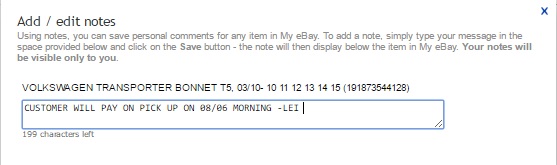
2. WRITE A NOTE ON EBAY STATING THAT THE ITEM IS FOR PICK UP AND WE'RE AWAITING PAYMENT
3. GO TO PINNACLE
Sales>Control Center>eBay>eBay Sales
Click the Little Refresh Button on the Upper LEFT Hand Side of the Page. This will generate the Work Order Faster

4. Once Work Order is generated, On the Invoice Tab, Write/Choose:
ID TYPE: Private: Other Photo ID
NUMBER: EBAY

5. EDIT THE WORK ORDER AS FOLLOWS:
1 - <NAME OF THE CUSTOMER> - EBAY - TO PAY COD ON PICK UP
2 - PICK UP TIME (8:00am, 11:00am, 2:00pm, and 4:00pm)
NOTE: If customer advised that he will pick up the item in between these times, choose the time earlier
than the time of pick up. Example: Customer advised that he will be at the store by 9:00am, choose
8:00am PICK UP.
3- PICK UP DATE

6. SAVE THE WORK ORDER AND EXIT
7. DON'T FORGET TO SEND A MESSAGE TO THE CUSTOMER THAT THE ITEM WILL BE READY ON THE DATE AND TIME OF PICK UP UNLESS THERE IS AN ISSUE WITH THE ITEM PURCHASED.
Related Articles
PICK UP BAY WEEKLY CHECK UP - SALES - SHIPPING - SENT EMAIL
LINK TO SHIPPING STAFF GUIDE DOC LINK TO SALES STAFF GUIDE DOC BRAD 19/10/2022WEEKLY EBAY/S11 SALES CHECK - JUNE 2021
We do this every week (Wednesday) to simply pick up on any transactions that have been missed/unfinalized, preferably after completing the S11 task for the day. STEP 1 - CUSTOMER BALANCE From Pinnacle, make sure you have this setup, ACCOUNTING - ...PHONE SALES -DAY 2 GUIDE - JJ SALES SYDNEY
IT IS ASSUMED YOU HAVE DONE SALES DAY 1 STEPS TO A SALE RETAIL-Broker- initially we wont broker ,FREIGHT -Customer pays for all as per guide and we arrange freight TRADE- Broker -we do (use online broker tips as a guide , FREIGHT -we arrange ,we ...Counter Sales -Basic Introduction ,Work flow guide and Training Steps
LINK TO GUIDE BRAD 29/06/2022SALES INCENTIVE PLAN- JJ SYDNEY
SALES INCENTIVE PLAN UPDATED The bonus is designed to set clear performance targets and reward performance All Sales team members are expected to achieve and receive sales bonus after training period In order to be part of sales team sales staff ...